Monday, January 10, 2011

Google Transcoder's Zooming Feature

If you're trying to load a web page using your mobile phone's browser, but the Internet connection is slow and you can't install Opera Mini, there's always Google Transcoder. Google's service shows a simplified version of the page that hides navigation links, removes scripts and compresses images.

Google Transcoder also has a "zoom out" feature that shows a screenshot of the page and lets you select the section you want to read. This means that Google has at least two databases of screenshots for all the indexed pages and Google knows a lot of about the structure of a web page.

Google Can't Find Paris

If you use Google to search for [Paris], the top search result is a Wikipedia page for PARIS (Paper Aircraft Released Into Space), "a privately-organised endeavour undertaken by various staff members of the information technology web site The Register to design, build, test, and launch a lightweight aerospace vehicle, constructed mostly of paper and similar structural materials, into the mid-stratosphere and recover it intact".

Most likely, the top search result should have been the Wikipedia page for the capital of France, but a bug replaced it with a page about a curious project.


Search for [the capital of France], and the second search result is the same page about the space project. It's as if someone performed a search and replace in Google's index.


Update (a couple of days later): It has been fixed.

{ a faux pas spotted by Jérôme Flipo }

Google Goggles Solves Sudoku Puzzles

Google's visual search tool has a new trick up its sleeve: solving Sudoku puzzles. Google Goggles 1.3 for Android scans barcodes much faster, recognizes print ads from the major U.S. magazines and newspapers, but most people will probably ignore those useful features and will try to see if Goggles can actually solve Sudoku puzzles. The nice thing is that this feature also works in the latest version of Google Mobile App for iPhone, along with print ads recognition.

"Now, Goggles on Android and iPhone can recognize puzzles and provide answers to help make you faster than a Sudoku champ. So if you ever get stuck, take a clear picture of the entire puzzle with Goggles and we'll tell you the correct solution," explains Google.

Maybe providing a hint would also be useful, especially if you want to solve the puzzle.


The new features show that Google Goggles has a lot of potential, but it's still not useful enough in the real world. An interesting article from Xconomy quotes Hartmut Neven, Google's technical lead manager for image recognition, who says that Goggles is not yet an universal visual search tool. "What keeps me awake at night is, 'What are the honest-to-God use cases that we can deliver,' where it's not just an 'Oh, wow.' We call it the bar of daily engagement. Can we make it useful enough that every day you will take out Goggles and do something with it?"

Sunday, January 9, 2011

Android Addresses UI Shortcomings

It's amazing to see how much Android's user interface has changed ever since Matias Duarte was hired by Google to improve Android. Matias has previously worked on Sidekick, Helio and Palm's WebOS, so Android is a perfect fit for him. In only 9 months, Matias Duarte and his team managed to address a lot of Android's UI shortcomings: a virtual keyboard that wasn't good enough, an uninspired interface for multitasking, the hidden menus that required to click on a soft key to display them, inflexible soft keys that were restricted to a single orientation.

Here's, for example, the navigation bar that replaces the hidden menu for common actions in Android Honeycomb:


The Gmail app currently available in the Android Market requires to use a hidden menu to perform common actions like composing mail or going back to the inbox:


Here's a comparison between the Froyo keyboard and the Gingerbread keyboard. According to Google, "the Android soft keyboard is redesigned and optimized for faster text input and editing. The keys themselves are reshaped and repositioned for improved targeting, making them easier to see and press accurately, even at high speeds."


In an interview with Joshua Topolsky from Engadget, Matias says that Honeycomb is the future of Android in terms of user experience. His job is to make Android's interface so good that companies like HTC or Samsung don't have to spend so much time improving it. The stock user interface will raise the bar high enough to be more than a solid foundation.
You're not working on one product, you're not saying "we're one company, vertically integrating and making one product and we're going to focus on one market and we're going to try and meet that particularly need." But instead, the idea is that there's a common problem that every company that wants to succeed in making computing better, making computing mobile has and that's the fundamental platform problem. We're not only going to try to find a way to get everybody to benefit from it, we're going to do it for free. We're going to work on building this common tide that rises all boats.

It's interesting to think of Android as "the tide that rises all boats", a platform that accelerates mobile development not just for smartphones, but also for tablets, media players, digital cameras, TVs, cars, appliances and much more.

Drag and Drop Uploading for YouTube Videos

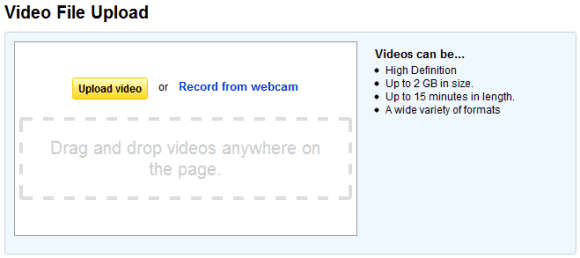
Why download YouTube videos when it's so easy to upload videos? Now you can drag and drop multiple videos on YouTube's upload page instead of using the operating system's file open dialog. The new feature requires a recent version of Google Chrome and Firefox because it uses HTML5 APIs.

Two other Google services that support drag and drop uploading are Gmail and Google Docs, but other services will probably follow suit.


{ Thanks, Sterling. }

YouTube's HTML5 Rickrolling

YouTube's HTML5 interface has a very cool feature: if you right-click on a video, you'll no longer see the boring contextual menu displayed by the browser that added uninteresting features like downloading videos. Instead, you'll get a much more useful menu that sends you to Rick Astley's "Never Gonna Give You Up" video.

Some would say that this trick reminds them of the sites that annoyed users by disabling browser features like the contextual menu so that people can't save an image or copy some text. But that's not what happens here: YouTube's terms of use forbid users from downloading videos and the new menu solves this issue by offering a better option. After all, why download a video when you can listen to Rick Astley's fabulous song?


There are at least two uncivil browsers (Firefox and Opera) that treat videos just like images and allow users to right-click on a video and download it. Firefox even lets you disable custom contextual menus for all sites, while Opera provides more granular options. There's even a developer that breached YouTube's terms of use by creating a Greasemonkey script with a strange name: Youtube HTML5 Beta "Save Video As" Unrickroller. Apparently, he lost his sense of humor or he's not a Rick Astley fan.

I'm not going to use any of these features and I'll switch to Internet Explorer, a browser that doesn't offer a download option for videos (mostly because it doesn't support HTML5 videos). Whenever I want to download a YouTube video, I'll ignore all those scripts and tricks and I'll read YouTube's terms of use, while listening to Rick Astley's song. They're a perfect match.

"... You know the rules and so do I ..."

Thursday, January 6, 2011

Google Docs Plays Videos

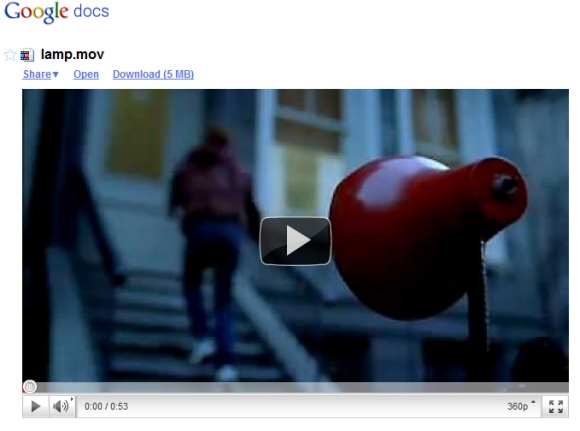
Google Docs lets you upload any kind of files, but not many of them can be previewed in Google Docs. You can open Microsoft Office documents and presentations, PDF files and some images. Now you can also play videos.
Uploaded video files can be up to 1 GB. These are the most common video formats that you can upload and play:

* WebM files (Vp8 video codec and Vorbis Audio codec)
* .MPEG4, 3GPP and MOV files - (h264 and mpeg4 video codecs and AAC audio codec)
* .AVI (many cameras use this format - typically the video codec is MJPEG and audio is PCM)
* .MPEGPS (MPEG2 video codec and MP2 audio)
* .WMV
* .FLV (Adobe - FLV1 video codec, MP3 audio)

Since Google uses YouTube's player, it's obvious that these are the formats supported by YouTube. After uploading a video to Google Docs, you'll have to wait until it's processed.

Why would someone upload videos to Google Docs instead of using YouTube? When Google adds more free storage to Google Docs and makes it easy to sync all your files, you'll upload documents, photos, music files and videos. Google Docs lets you organize files into folders, share multiple files with your friends and even keep old versions of your files.


Tip. To find all the videos uploaded to your Google Docs account, use this URL: https://docs.google.com/#videos.

{ Thanks, Cougar Abogado. }