Wednesday, August 18, 2010

Picasa Web Stats in Google Analytics

Picasa Web Albums has an option that lets you see detailed visitor stats for your photos. If you go to the Settings page, you can enable "photo tracking". The only thing you need is a Google analytics tracking code.


Picasa Web's help center explains that you need to create a new Google Analytics account (not a new Google account) to monitor Picasa Web Albums photo traffic. After creating the new account, find the account ID that looks like UA-xxxxxxx-y and enter it in the Google Analytics tracking code box from Picasa Web Albums. "Once the setup is complete, just sign in to Google Analytics and click View reports to see visitor stats for your photos. It can take up to 24 hours for Analytics to detect your tracking code."

A similar option is available for Google Docs, but only for published documents. While this feature is useful, it's not very easy to use and it's not properly integrated with Google Docs and Picasa Web. Showing simple stats, like the number of views, the top search queries and referring websites, in a special section of Google Docs and Picasa Web would be a much better idea.

Link Your Google Profile with Picasa Web Albums

Picasa Web Albums added an option to connect the service with Google Profiles. Before Google Profiles was released, each Google service used separate profiles, so you had to enter personal information multiple times.

"Picasa Web Albums are now compatible with your Google Profile! Now when you use Picasa Web Albums, you can use the same profile name and photo that you use on your Google Profile. Your Picasa Web Albums will link to your Google Profile, and your profile will link to your public albums," informs Google's photo service.


After linking your Google Profile with Picasa Web Albums, you can edit the profile and remove the link to your public albums.

If you've previously used an alias to hide your Gmail address from the URL, you can no longer use it after merging the profiles. The only option you have is to use the same ID number from Google Profiles.

It's interesting that Picasa Web's code calls this feature "merged profiles softlaunch", which suggests that users aren't required to merge profiles, but that will change in the future.

Tuesday, August 17, 2010

Chrome Web Store and Online Games

1up.com reports that Google Chrome Web Store will be launched in October and online games will be one of its main attractions. "Set to launch this October, the store aims to make a proper marketplace for browser games -- one that solves a lot of the issues of games on the web today, from discovery to monetization."

Google's game developer advocate, Mark DeLoura, thinks that it's difficult to find great online games, so Google Chrome Web Store tries to solve this problem by allowing users to rate games and write reviews. Chrome users will be able to install games, which adds shortcuts to the "new tab" page and grants additional permissions to the games. Not all games will be free, but Chrome users can buy games directly from the Web Store and pay using Google Checkout. Google's platform will support free trials and subscriptions, while developers will only pay a 5% processing fee for each transaction.


Will users pay for web apps in Chrome's store? More than half of the Android apps are free and paid Android apps are only available in 13 countries because of Google Checkout's limitations. Android Market doesn't make it easy to find interesting new applications and doesn't recommend other applications based on the ones you've installed. Hopefully, Chrome Web Store will do a much better job than the Android Market.

Monday, August 16, 2010

Eric Schmidt On the Future of Search

In an interesting interview for the Wall Street Journal, Google's CEO talks about the future of search. Eric Schmidt says that there are more and more implicit searches and that Google could become a virtual assistant that offers suggestions and solves problems without having to define them.

"We're still happy to be in search, believe me. But one idea is that more and more searches are done on your behalf without you needing to type. I actually think most people don't want Google to answer their questions. They want Google to tell them what they should be doing next."

As Google knows "roughly who you are, roughly what you care about, roughly who your friends are", it could suggest interesting things. For example, if you're using a smartphone, Google could inform you that there are interesting things around you (maybe a bookstore that sells a book you've added to a wishlist).

"The thing that makes newspapers so fundamentally fascinating — that serendipity — can be calculated now. We can actually produce it electronically. The power of individual targeting — the technology will be so good it will be very hard for people to watch or consume something that has not in some sense been tailored for them," says Eric Schmidt. "As you go from the search box [to the next phase of Google], you really want to go from syntax to semantics, from what you typed to what you meant. And that's basically the role of [Artificial Intelligence]. I think we will be the world leader in that for a long time."

To better understand queries and to answer questions that were never asked explicitly, Google has to learn more about users and that's one of the reasons why Google struggles to build successful social services.

Three years ago, Eric Schmidt said that "the goal [of search personalization] is to enable Google users to be able to ask the question such as 'What shall I do tomorrow?' and 'What job shall I take?' We cannot even answer the most basic questions because we don't know enough about you. That is the most important aspect of Google's expansion."

I don't think users "want Google to tell them what they should be doing next", but they probably want a tool that helps them solve problems, even when those problems can't be easily transformed into search queries. A real-word query can be a document, a spreadsheet, a list of words, an image, a sound, a short video, a location and it's really difficult to provide relevant results without targeting and personalization.

Gmail's Hidden Groups

In a previous post, I mentioned a trick that lets you create a Gmail group for the people you follow in Google Buzz. The downside was that the group doesn't update when you follow other people in Google Buzz.

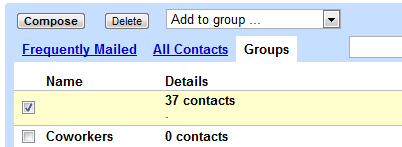
It turns out that Gmail already has a built-in group for Google Buzz contacts. The group doesn't have a name and it's not displayed in Gmail's new contact manager, but you can find it in the old version of Gmail: it's the only one without a name.


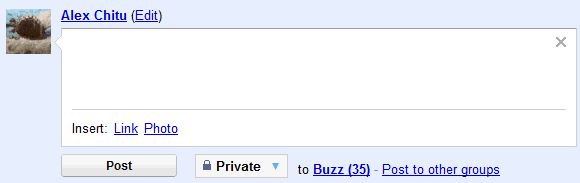
Since the group doesn't have a name and it's hidden in the interface, you can't use it to send email messages or to post private Buzz messages, but you can select all the contacts and add them to another group.


There's also a hidden group for Google Latitude friends, which includes the people that can see your location in Google Latitude.

Another group lists all your Gmail Chat/Google Talk friends. Some of these people were automatically added by Google if you didn't disable "Automatically allow people I communicate with often to chat with me and see when I'm online" in the settings.

For those who miss the "all contacts" group in the new contact manager, here's the built-in group that includes both the people you've manually added ("my contacts") and the people automatically added by Google ("other contacts").

Sunday, August 15, 2010

Create a Google Buzz Group

Google's contact manager doesn't include built-in groups for Google Chat friends or for the people you follow in Google Buzz. Fortunately, you can easily create a group for the people you follow in Google Buzz using a clever trick found by Siegfried Hirsch:

1. Go to Gmail's contact manager and search for http://www.google.com/profiles. Here's the URL for the search results.

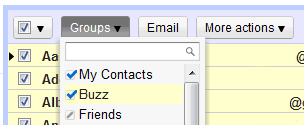
2. Select all the results, click on the "Groups" drop-down and then on the "Create new" option.

3. Create a new group called "Buzz".

This works because Google automatically adds each Google Buzz user you follow to your contacts list and also includes the address of the Google Profile. If you've manually removed Google Profile address or added Google Profile addresses to other contacts, the results won't accurately reflect your Google Buzz group. Obviously, the group won't update automatically when you follow/unfollow Google Buzz users.


Google could use a lot of information from other services to enrich Google Contacts: the photos you tag in Picasa Web Albums, information and links from Google Profiles, Google Latitude location, the most recent Google Buzz message, but that will probably happen when Google Me is released.

Friday, August 13, 2010

Blogger Adds Spam Filter for Comments

Blogger's commenting system still needs a lot of work. Even though you can now display the comment box below the post, you can subscribe to comments by email and sign in using OpenID, the authentication procedure is still clunky, you can't reply to a message, read other comments from the same user or edit a comment after posting it.

The good news is that Google finally solved two big problems for Blogger authors: comment spam and managing comments. If Gmail has a great spam filter, why Blogger can't use a similar technology to detect spam comments?

"Blogger now filters comments that are likely spam comments to a Spam Inbox, much like the spam folder in your email. When someone leaves a comment on your blog, it will be reviewed against our spam detector, and comments that are identified as possible spam will be sent to your blog's Spam Inbox, found at Comments | Spam," explains Blogger's help center.


Blogger's spam filter works well and you can improve it by clicking on "Not spam" next to a false positive or mark as spam a message that hasn't been filtered.

Now it's easier to manage the comments from your blog even after they're published. The new Comments tab lists all the published comments and lets you delete them or mark them as spam. You no longer have to visit each blog post and manually remove spam comments.


Blogger's help center says that the Comments tab should be displayed even if you don't enable comment moderation. Unfortunately, the tab disappears when you disable comment moderation. As Blogger's blog admits, comment moderation can be annoying. "To fight spam, some of you enabled moderation of all comments or required word verification or login. While somewhat effective, these checks limit real-time conversations around your blog."

For now, I've enabled comment moderation for posts that are older than 30 days. Hopefully, you'll no longer see spam comments.