Showing posts with label Google Buzz. Show all posts

Saturday, October 2, 2010

Gmail Tests Recent Buzz Section

Gmail experiments with a new sidebar feature that shows a list of recent Buzz messages from the people involved in a conversation. Google.org.cn (English version) says that this feature is currently available for Google Trusted Testers.


Gmail should show more useful information in the sidebar: related conversations, related news, options that let you highlight and annotate some excerpts from a message.

Thursday, September 30, 2010

Picasa Web Groups Google Buzz Albums

Picasa Web Albums is the central repository for all the photos uploaded to Google's services. If you upload photos to Blogger, Google Buzz, Orkut or upload a background image for Google's homepage, your photos are stored in Picasa Web Albums.

Unfortunately, Google creates many albums that clutter the interface. For example, Google Buzz creates a new album every time you upload one or more photos. Picasa Web addressed this issue by grouping all the Buzz albums in a special gallery called "Photos from posts".


Google Buzz is not the only service that adds unnecessary albums: Blogger creates albums to store the photos uploaded to your blogs. Picasa's albums aren't a good way to organize photos because they have limitations (the maximum number of albums has been recently increased to 10,000), you can't store the same photo in multiple albums and individual photos don't have privacy controls. Until Picasa Web Albums drops "Picasa" and "albums" from its name and becomes Google Photos, the service will be an online extension of a desktop software and will inherit Picasa's flaws and limitations.

{ via Adewale }

Tuesday, September 14, 2010

Google Buzz Is Here to Stay

Many tech blogs say that Google Buzz is an unsuccessful project and Google will have to abandon it. Google Buzz is not an experimental service like Google Wave, it's an extremely important project for Google's future and it's a key component of Google's social strategy.

To see how important is Google Buzz for Google, consider that Buzz wasn't launched in Google Labs. It wasn't even launched as a standalone service: Google Buzz was integrated with Gmail, one of the most popular Google products. Google Buzz is also the only Google service that has a special icon and a special search command on Google's mobile site. In less than 7 months since Buzz's launch, the service already has a powerful API, it's integrated with Google Maps, Google Reader, Picasa Web Albums and it's constantly improving.

Google Buzz is actually the service planned in 2007 whose goal was to integrate Google's social applications and become the central place for sharing photos, documents, videos, news with your contacts. Google Buzz already streams some activities from Google Reader, Picasa Web Albums, Blogger, YouTube.

Google Photos blog reports that Google Buzz can now share private Picasa Web Albums:

"It used to be all or nothing when it came to sharing a new Picasa Web Album in Buzz. If you created a public album in Picasa Web Albums, it created a public Google Buzz post. That was great for when you wanted to share your photos broadly. But for those times when you wanted to share with a smaller circle — no Buzz. Now when you create a private album, the select people you choose to share your photo album with will see a notification in Google Buzz as well."


Google Buzz also added two other important features: muting posts by source, so you can hide someone's Twitter posts, Flickr photos or the posts from another source, and editing posts and comments from the mobile interface.

It should be clear that Google Buzz is here to stay, even as a feature of a future service.

Monday, August 16, 2010

Gmail's Hidden Groups

In a previous post, I mentioned a trick that lets you create a Gmail group for the people you follow in Google Buzz. The downside was that the group doesn't update when you follow other people in Google Buzz.

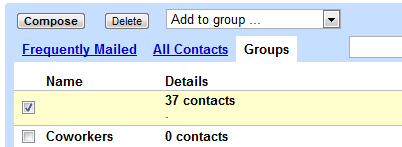
It turns out that Gmail already has a built-in group for Google Buzz contacts. The group doesn't have a name and it's not displayed in Gmail's new contact manager, but you can find it in the old version of Gmail: it's the only one without a name.


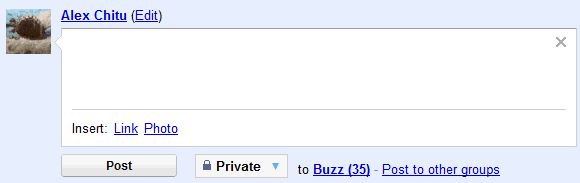
Since the group doesn't have a name and it's hidden in the interface, you can't use it to send email messages or to post private Buzz messages, but you can select all the contacts and add them to another group.


There's also a hidden group for Google Latitude friends, which includes the people that can see your location in Google Latitude.

Another group lists all your Gmail Chat/Google Talk friends. Some of these people were automatically added by Google if you didn't disable "Automatically allow people I communicate with often to chat with me and see when I'm online" in the settings.

For those who miss the "all contacts" group in the new contact manager, here's the built-in group that includes both the people you've manually added ("my contacts") and the people automatically added by Google ("other contacts").

Sunday, August 15, 2010

Create a Google Buzz Group

Google's contact manager doesn't include built-in groups for Google Chat friends or for the people you follow in Google Buzz. Fortunately, you can easily create a group for the people you follow in Google Buzz using a clever trick found by Siegfried Hirsch:

1. Go to Gmail's contact manager and search for http://www.google.com/profiles. Here's the URL for the search results.

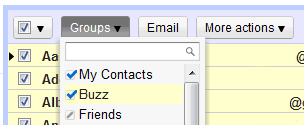
2. Select all the results, click on the "Groups" drop-down and then on the "Create new" option.

3. Create a new group called "Buzz".

This works because Google automatically adds each Google Buzz user you follow to your contacts list and also includes the address of the Google Profile. If you've manually removed Google Profile address or added Google Profile addresses to other contacts, the results won't accurately reflect your Google Buzz group. Obviously, the group won't update automatically when you follow/unfollow Google Buzz users.


Google could use a lot of information from other services to enrich Google Contacts: the photos you tag in Picasa Web Albums, information and links from Google Profiles, Google Latitude location, the most recent Google Buzz message, but that will probably happen when Google Me is released.