Friday, November 5, 2010

New Gmail Themes

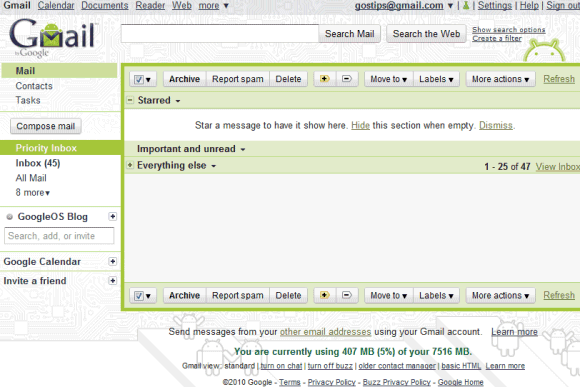
There are many Gmail themes to choose from, but few of them are actually usable. Gmail added 5 new themes: Basic Black, Basic White, Tree Tops, Marker and Android.

Even if you're not an Android fan or you don't have an Android phone, you should really try the Android theme. It's simple, stylish and you can still read your messages.


If you're looking for a minimalist theme, Basic White is a good alternative to Minimalist, an already existing theme. It looks a little bit unfinished, but Google says it's the Gmail interface stripped "to the bare bones".


What's your favorite Gmail theme?

Thursday, November 4, 2010

Mobile Google Instant

Google Instant is now available for mobile phones, but it's not enabled by default. If you visit Google's homepage using an iPhone running iOS4 or an Android Froyo phone, you can enable the feature by clicking on "Turn on" next to "Instant (beta) is off".

Google Instant should be useful on a mobile phone, especially if it doesn't have a hardware keyboard. When typing popular queries, it's amazing to see that Google predicts your searches from the first few letters.

Unfortunately, the mobile version of Google Instant doesn't have all the benefits of the desktop version. Since the virtual keyboard covers most of the screen, you can't see the search results until you hide the keyboard. Another issue is that you can't press Tab to use Google's prediction and continue to type your query. Google Instant doesn't work well if you use a mobile Internet connection because of the high latency.


Google says that you should notice "a big improvement in speed when you search thanks to a new AJAX and HTML5 implementation for mobile that dynamically updates the page with new results and eliminates the need to load a new page for each query. Google Instant for mobile works best on 3G and WiFi networks, but since the quality of any wireless connection can fluctuate, we've made it easy to enable or disable Google Instant without ever leaving the page".

Google Chrome's Version Number Is Meaningless

Google Chrome is the first browser that has a meaningless version number. Since Chrome is automatically updated, most people use the latest version of the software a few days after it's released.

Google's help articles aren't the only ones that ignore Chrome's version number. Yahoo has recently released a report that recommends developers to assume that Chrome users are running the latest version.

"Chrome has been progressing rapidly through versions, and Google has communicated its intent to continue rapid development and short release cycles. As a result, we've modified our strategy for Chrome to advise testing on the latest [generally available] release of Chrome as soon as it is issued, with prior versions moving to X-grade as soon as they are superseded."

Now that Google Chrome has a new major release every six weeks, you won't see too many new features. Chrome 7 focuses on "hundreds of bug fixes", while Chrome 8 enables the internal PDF viewer. Chrome's releases aren't exciting because the browser is constantly improving and you don't have to wait one year or more to see the new features.

Wednesday, November 3, 2010

An Android Keyboard that Uses Google Scribe

Google Scribe may not seem very useful, but it's one of the features that could significantly improve virtual keyboards from mobile phones. Instead of showing suggestions from a dictionary, Google Scribe can provide contextually-relevant suggestions.

Scrybe is a free Android keyboard that uses Google Scribe to generate suggestions. It's not developed by Google and it uses an unofficial Google Scribe API, but it's an interesting application.


Scrybe needs to fix many issues to become really useful. If you delete some letters from word, Scrybe is not able to detect that you're not writing a new word. Another problem is that you can't type very fast because Scrybe tries to fetch the suggestions.

Reddit users think that SwiftKey has a better approach: it preloads the data, so there's no lag. "So this is basically the same thing as SwiftKey, but offloaded to Google's servers? Seems to work well, but no better (and slower) than SwiftKey," says Podspi. SwiftKey is $3.99 and there's a two-week trial.

{ Thanks, David M. }

Tuesday, November 2, 2010

Google Docs Adds Version History for Uploaded Files

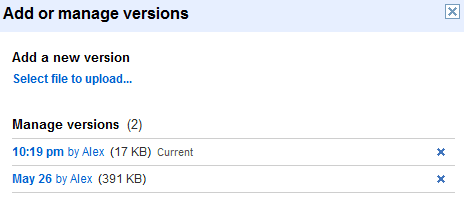
Here's a feature that will come in handy when Google Docs adds support for syncing: version history for files. Until now, Google offered this feature for the documents that could be edited in Google Docs, but not for PDFs and other files.

"Previously, each time you updated a file, you would have to upload the new version as a new file with a new URL, re-share it, and put in the correct folders again. When you select the Add or manage versions option on any file, you can upload new versions of a file, download previous versions, and delete older versions."


Unfortunately, this only works when you manually add a new version of a file. If you upload a file that has the same name as an existing file, Google Docs doesn't add a new version and you'll end up with two files. Dropbox is smarter and it automatically updates the existing file. Another issue is that you can't preview the versions of a PDF file in Google Docs, since the only option is to download the files.

Coming Soon in Google Docs: Third Party Apps, Cloud Printing and Sync

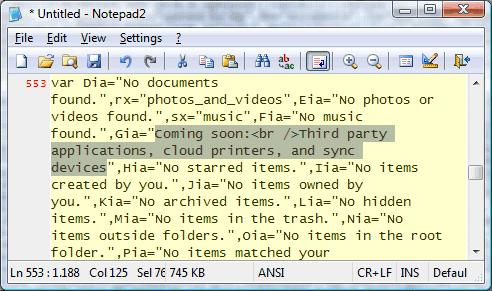
Google Docs' source code includes a message that reveals some important upcoming features: "Coming soon: Third party applications, cloud printers, and sync devices".

Cloud printing is a project that will enable applications on any device to print documents. "This goal is accomplished through the use of a cloud print service. Apps no longer rely on the local operating system (and drivers) to print. Instead, apps (whether they be a native desktop/mobile app or a web app) use Google Cloud Print to submit and manage print jobs." Google says that printers "are treated in much the same way as documents are in Google Docs". Cloud Print will be implemented in Google Chrome and Google Chrome OS, so it will probably launched in the coming weeks.

If you can synchronize your calendar, your contacts or your mail, why not synchronize the documents stored in Google Docs? That's one of the most important missing features from Google Docs. Google already offers some APIs for uploading and downloading files, but they're limited to documents, spreadsheets and presentations if you don't use Google Apps Premier Edition.

Google Docs has applications for editing documents, spreadsheets, presentations and for viewing PDF files, but what about other file types? There's no photo editor, no video editor, no application for editing PDF files or for extracting files from archives. Third party applications could solve some of these issues and make Google Docs even more useful.
Fusion Tables Will Be Available in Google Docs

Fusion Tables is an interesting service launched last year in Google Labs to help users manage large data sets. "Fusion Tables is not a traditional database system focusing on complicated SQL queries and transaction processing. Instead, the focus is on fusing data management and collaboration: merging multiple data sources, discussion of the data, querying, visualization, and Web publishing," explains Google.


Fusion Tables has graduated from Google Labs in September and it will become a Google Docs app. As you can see from the screenshot below, Google Docs includes fusion tables in the list of document types and there's also an icon for fusion tables. Users can already import tables from Google Spreadsheets and sharing works just like in Google Docs.