Showing posts with label Google Calendar. Show all posts

Monday, May 9, 2011

Google Calendar Adds Event Colors

Google Calendar still doesn't offer support for labels, but you can now pick a color for each event. By default, each event inherits the calendar's color, but you can change it by clicking the event and using the small drop-down displayed next to the event's title.

"Color Coded Events lets you assign specific colors to certain events: put pink on your daughter's soccer practice or make your lunch dates red. It's a great way to stay organized, keep track of recurring events, and add a little flair to your calendar. Color coding is private to you and anybody who can edit your calendar," explains Google.


If you want even more options, go to Google Calendar Labs and enable "Event flair" to be able to add icons to your events.

{ Thanks, Brahm. }

Wednesday, April 13, 2011

Google Calendar's Favicon Changes Every Day

When Google Calendar changed the favicon, many people wondered why it only shows 31. "Does it mean that starting today, every day will be the 31st ? Serously, favicon should be changed everyday to match the date," suggested a Google Calendar user.

Google listened to the feedback and the favicon will now change every day. "When you look at the Google Calendar icon at the top of your browser window, it will no longer always display 31 but will instead change to reflect the current day of the month. Today's date is now always a short glance away."


Google Calendar is the first Google service that has a dynamic favicon, but you can change Gmail's favicon to show the number of unread messages.

Saturday, March 19, 2011

Quickly Edit Google Calendar Events

You no longer have to double click on a Google Calendar event to edit its name. Now you can just click on the event's name and quickly edit it from the description balloon.


{ Thanks, Maarten. }

Friday, September 17, 2010

Google Calendar Sound Notifications

Google Calendar has a Labs feature called "Gentle reminders" that replaces pop-up reminders with better notifications. "When you get a reminder, the title of the Google Calendar window or tab will happily blink in the background." If you use Google Chrome, you can also enable desktop notifications in the settings.


Google has recently added sound notifications. You can enable this feature by going to Settings > Gentle reminders (labs) and selecting Play a sound notification together with reminders (requires Flash).

{ spotted by François Beaufort }

Saturday, August 28, 2010

Google Calendar's Event Scheduling Feature is Back

Last year, Google Calendar tested a feature that made it easier to schedule events with guests. The "sneak preview" was only available for a few months, but now it's back. Google calls it "find a time" and you can use it when you create an event. "If you're able to view your guests' calendars (via sharing, Google Apps shared access, or because they've made their calendars public), you'll be able to compare schedules and pick a time that works for everyone," explains Google.


Google Calendar redesigned the page that lets you create events and added a more intuitive dialog for repeating events. "The old interface for creating recurring events was clumsy and took up too much space on the screen," admits Google. "Now you'll see only a summary of your recurring event on the main event page; if you want to edit it, you can use a window that opens when you select the 'Repeats' checkbox."

Tuesday, August 24, 2010

New Google Calendar Favicon

You might have noticed that Google Calendar has a new favicon that replaces a monthly calendar with a daily calendar.


Google Calendar is not the only Google services that has recently updated the favicon: Google Sites and Google Translate have new shortcut icons and it's likely that many other Google sites will use the colorful images from this page.


{ Thanks, James, Bastian, Matt, Lasse, Gamer and Neil. }

Monday, August 23, 2010

Google's iPhone App Adds Notifications for Gmail and Google Calendar

I rarely use the native email clients from Android and iPhone. Gmail's mobile web app has a better interface and it's easier to use than those applications, but there are some limitations that force you to switch to the native apps: you can't attach files and there's no support for notifications. Until mobile browsers add support for these features and integrate with the operating system, native apps will continue to be more powerful.

The latest version of Google Mobile App for iPhone solves one of these issues by adding push notifications for Gmail and Google Calendar. You no longer have to use Google Sync to get notifications when you receive an email message or an event is about to occur.

"Now Google Mobile App can help with push notifications from your Google account to your iPhone -- an icon badge shows you’ve got new mail in Gmail, and Google Calendar event reminders appear right on your home screen."
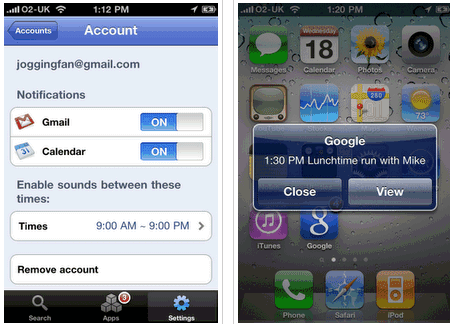

After updating Google Mobile App 0.6, it seems that Google only shows a badge when you get a new message, just like the native mail client.

Update: Google's mobile blog says that "you will only receive pop-up messages and sound/vibration for calendar alerts - new email is shown using the unread count on the Google Mobile App icon and in the apps tab".