Thursday, February 3, 2011

9 Things to Try in Google Chrome 9

Google Chrome 9 is now available, two months after the previous release and two weeks later than Google's self-imposed deadline. Here are 9 features you should try in this new version:

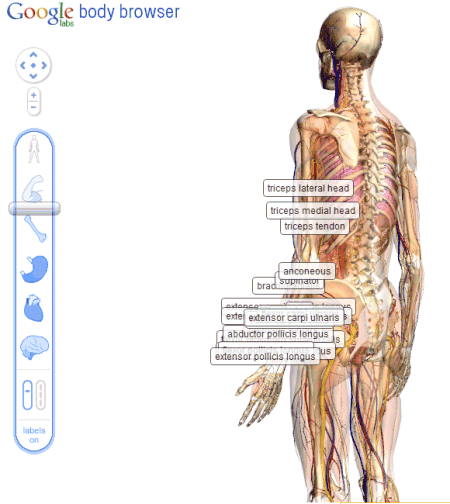
1. WebGL is now enabled by default in Google Chrome and you can try the 3D web apps from Google's gallery. Don't miss Body Browser, a Google Earth for the human body, and the WebGL Aquarium.

2. Google Instant is now integrated with Chrome's address bar, but this feature is not for everyone because it automatically loads web pages as you type. It's disabled by default, so you need to enable it by checking "Enable Instant for faster searching and browsing" in the Options dialog.

3. Cloud Print can be enabled from Options > Under the hood if you use Windows. This features lets you print from devices that can't communicate directly with printers. The first two applications that use Cloud Print are the mobile versions of Gmail and Google Docs.

4. Chrome supports WebP files. WebP is a new image format created by Google whose main advantage is that it offers better compression. "Our team focused on improving compression of the lossy images, which constitute the larger percentage of images on the web today. To improve on the compression that JPEG provides, we used an image compressor based on the VP8 codec that Google open-sourced in May 2010." Here's an example of WebP image.

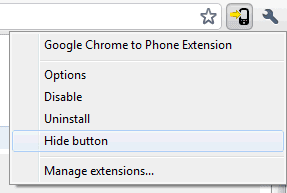
5. Right-click on an extension button next to the address bar and select "Hide button". When you change your mind, go to Tools > Extensions and click on "Show button" next to the corresponding extension.

6. Create desktop shortcuts for your web apps: right-click on an app in the new tab page and select "create shortcut". You can also add shortcuts to the Start Menu and the Quick Launch Bar if you use Windows.
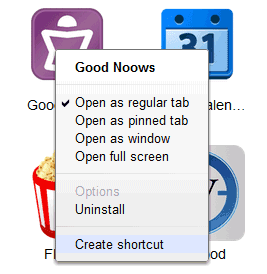

7. Launch web apps in a new window. Right-click on a web app and select "open as window".

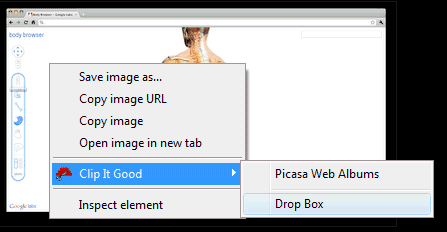
8. Install extensions that add custom menu options to images. For example, install Clip It Good to upload any image from a web page to Picasa Web Albums.

9. Install extensions that use the Omnibox API to associate keywords with new search engines. For example, install the DOI Resolver extension and type doi 10.1205/096030802760309188 in the address bar. The extension added a new search engine and associated it with the keyword doi.

Blogger's Android App

Blogger is catching up with the times: Android users can finally post timely updates to their blogs using a native app. You can always use Blogger's site or even write your posts in a mail client, but a mobile app is more user friendly.

Blogger's Android app is really basic and doesn't offer too many features. It's mostly useful if you want to write a new post, since you can't edit the existing posts. The editor only lets you enter text and include one or more photos. You can add some labels and geotag your posts, taking advantage of your phone's GPS. If you haven't finished a post, you can always save it as a draft, but you won't be able to publish it from a computer because it's only saved locally.


Blogger's blog mentions that Blogger is a new sharing option, so you can easily share a photo from the Gallery or a web page. "By switching to the List View, you can view all your drafts and published posts that you wrote using the app." Unfortunately, you can't edit existing posts.

All in all, Blogger's Android app offers very few features and I would only use it to write short posts or to share photos from a trip. Maybe Blogger's team should also develop a mobile web app which could be updated faster.

Android Market link: Blogger's app.

Wednesday, February 2, 2011

Android Market for the Web

Google has finally released the Web-based version of the Android Market, which is now available at market.android.com. You can link to applications, find apps from your computer and install them over the air.

Android Market for the Web includes all the applications, not just the ones that are available for a certain device or a certain version of Android, so it's much more comprehensive than the application that's installed on your Android device. You'll be able to find paid apps even if you live in a country where you can only install free apps and you'll be able to find apps that require Froyo even if your phone still uses Android Donut. In fact, you don't even have to be an Android user to explore the Market.

I've tried to install an application from the web site, but Google shows an "invalid request" error after the authentication process.


To make the Market even better, Google announced two additional features that will be available soon: in-app purchases and fixed pricing for various currencies. That means you'll see less apps that cost $1.73 or €2.26, assuming that developers will adjust their prices.

From Android to iPhone: Google Shopper


More and more Google applications that used to be available only for Android are now ported to the iPhone. After Google Voice, Google Latitude, Google Places, Google Goggles (a feature of the Google Mobile App), iPhone users can now download Google Shopper, a product search tool that recognizes barcodes, supports voice search and lets you compare prices at online stores and local stores. It's actually a mobile version of Google Product Search that knows your location and has more input methods.

Google Shopper saves your history and lets you star products, but it doesn't integrate with Google accounts, so your data is only available on a single device. Another issue is that voice search times out too fast, so it's quite difficult too use.

According to Google, "Shopper is available for iPhone 3GS and iPhone 4 with iOS 4.0+ in English only for the United States and the UK."


There are still many Android-only apps (Sky Map, Google Translate, Gmail, Google Talk, Google Reader, Google Maps Navigation, Google Finance, Gesture Search) and it's likely that some of them will be available in Apple's App Store in the coming months.

Android Honeycomb's Browser Supports SVG

One of the most annoying things about Android's built-in browser was the lack of support for SVG (Scalable Vector Graphics). Android's browser was the most popular mobile browser that didn't support SVG and that was surprising, considering Google's push for better web apps.

Ariya Hidayat tried to see if Honeycomb's browser can handle SVG files and the good news is that the answer is affirmative. Hopefully, the next Android release for smartphones will include this feature.

Tuesday, February 1, 2011

Google Results, One of Bing's Ranking Signals

Danny Sullivan has a story about Google's claims that Bing copies Google search results. Google noticed that there's an increasing overlap between the top results at Google and Bing, so it suspected that Microsoft was using Google's results to improve its search engine.
To verify its suspicions, Google set up a sting operation. For the first time in its history, Google crafted one-time code that would allow it to manually rank a page for a certain term (code that will soon be removed, as described further below). It then created about 100 of what it calls "synthetic" searches, queries that few people, if anyone, would ever enter into Google.

These searches returned no matches on Google or Bing — or a tiny number of poor quality matches, in a few cases — before the experiment went live. With the code enabled, Google placed a honeypot page to show up at the top of each synthetic search.

The only reason these pages appeared on Google was because Google forced them to be there. There was nothing that made them naturally relevant for these searches. If they started to appeared at Bing after Google, that would mean that Bing took Google's bait and copied its results.

This all happened in December. When the experiment was ready, about 20 Google engineers were told to run the test queries from laptops at home, using Internet Explorer, with Suggested Sites and the Bing Toolbar both enabled. They were also told to click on the top results. They started on December 17. By December 31, some of the results started appearing on Bing. (...) Only a small number of the test searches produced this result, about 7 to 9 (depending on when exactly Google checked) out of the 100.

Microsoft's engineers probably thought that Google's results were pretty good, so why not use clickstream data from Internet Explorer and Bing Toolbar to monitor the results picked by Google users? It's a clever idea, but not when you're using it to artificially add results from Google. Bing's team says that they use "collective intelligence" to improve search results, so we can assume that a non-negligible amount of intelligence comes from Google. When you're including results just because Google does it, you're trusting Google too much and you implicitly admit that Google offers better results.

Update: Google's Amit Singhal says that "some Bing results increasingly look like an incomplete, stale version of Google results – a cheap imitation" and implies that Bing shows "recycled search results". I think that's an exaggeration and Microsoft has every right to use all the information it has, including analytics data, Bing Toolbar's clickstream, Facebook's popular pages and Twitter's trending topics. Bad mouthing competitors doesn't help Google in the long run.

Google Latitude Check-ins

Google Latitude is useful if you want to share your location with a group of friends, but not everyone wants to do that. As Foursquare's success showed, people want to manually "check in" and only share some of the places they visit.

To make Google Latitude more useful and to better integrate it with other social services, Google added support for check-ins. "You can still use Latitude to automatically update and share your location, but check-ins let you add context to the location — like captions to a photo," explains Google. It's an opportunity to improve Google Maps by sharing your favorite places, which could also make social recommendations better.


Check-ins connect locations to places and they're better suited for sharing because there's no real-time tracking involved. Google says that check-ins will be added to your Google Buzz stream and you can share them with your friends, make them public or private. There are some additional features that help you use check-ins: notifications to check in at a nearby place once you arrive, automatic check-ins at specific places, the option to check out and status level (visitor/Regular/VIP/Guru). Google Places pages include information about your check-ins, your friends' check-ins and your status.

Check-ins are supposed to work if you use the latest version of Google Maps for Android. If you use an iPhone, you should see a new version of the Latitude app in the near future. I've installed Google Maps 5.1 for Android, but I couldn't find the new features.


Google says that there are 10 million active Latitude users. Check-ins could attract new users and make Google's social services more popular.

Ironically, check-ins were made popular by Foursquare, a startup created by Dodgeball's founder and former Google employee Dennis Crowley. Dennis quit Google two years after Google acquired Dodgeball. "The whole experience was incredibly frustrating for us - especially as we couldn't convince them that dodgeball was worth engineering resources, leaving us to watch as other startups got to innovate in the mobile + social space."

{ Thanks, Michael. }